Social Login
Available since version 0.7.2
BaasBox provides an API that allows you to connect/create your users
through social networks.
BaasBox social API is integrated with the following social networks: -
Facebook - Google +
We are planning on adding more in the near future.
The use of an API in a client application needs an appKey and an
appSecret usually provided by the social network itself. More
information on how you can get those values can be found here:
Once you create your app inside the social network you will have access
to the apiKey / apiSecret values; those values must be stored into
the BaasBox database in order to use BaasBox social feature: you can
access the social login tab from the settings menu in the admin console.
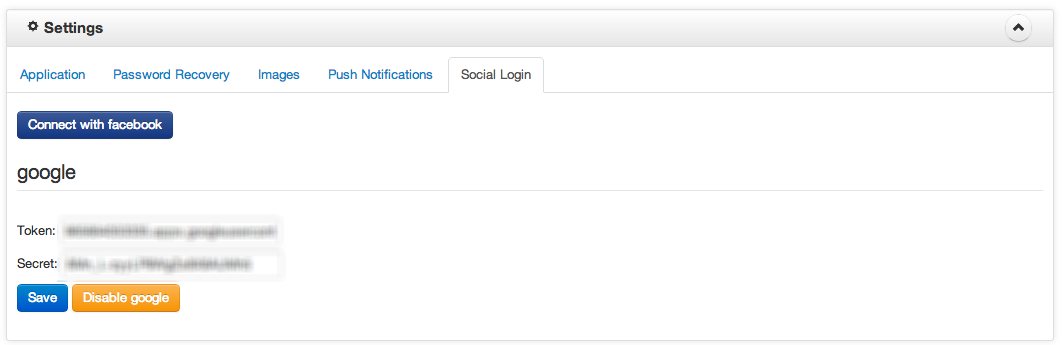
Then click on the specific social network you are working on and fill in
the form with the keys and press Save. You can disable the social
feature for a specific social network by pressing the disable xxx
button

Once you have connected to a social network you can use any client
library to obtain the OAuth tokens for users account, and store them
with the social API provided by BaasBox.
You can find an application example and tutorial `here http://www.baasbox.com/social-login/`_:
API documentation
Retrieve all social network connections for connected user
GET /social
Headers:
- X-BAASBOX-APPCODE: App Code
- X-BB-SESSION: Session token for current user
Returns a JSON representation of the social network connected to the
user along with all the information retrieved at the moment of
login/linking. An example of the returned data is:
data": [
    {
        "username": "xxx",
        "password": null,
        "from": "google",
        "token": "<token>",
        "secret": "<secret>",
        "id": "<userid>",
        "additionalData": {
            "email": "<email>",
            "name": "<name>",
            "avatarUrl": "<avatar>",
            "personal_url": "<personal_url>"
        }
    }
This API should be invoked with a valid X-BB-SESSION header and a valid
X-BAASBOX-APPCODE header as specified in the authorization section of
the doc.
This method can be used to retrieve the tokens to post on the social
network wall using a client SDK provided by the social network itself.
Returns:
- 200 code with a JSON object which data property contains all the
linked social networks to the current user.
- 404 code if the user does not have any social network linked to their
account
- 401 code (Unauthorized) if one of the mandatory headers are missing
Login a User with a specified social network
POST /social/:socialNetwork
Headers: X-BAASBOX-APPCODE = App code
Url parameters
:socialNetwork could be facebook or google
Parameters:
This method allows to login into the BaasBox app using the tokens
obtained by a social network client library. If the user has already
logged in with same tokens the server will simply return the
X-BB-SESSION token that will be used for further requests.
If the user does not exist it will be created and an X-BB-SESSION token
will be returned. Upon user creation some data will be extracted from
the social network profile and they will be stored inside the user
object. A username will be uniquely generated (to prevent username
collision). Therefore after a succesfull login, if necessary, the client
app may ask for a username and update the user object accordingly.(See
the example `here http://www.baasbox.com/social-login/`_:)
Returns:
- 200 code with the user’s X-BB-SESSION token
- 400 code if one of the oauth_token or oauth_secret was missing
- 401 code if the X-BAASBOX-APPCODE header was missing
- 500 code if something on the server went wrong (i.e. another user
with the same tokens already exists)
Link a user to a specified social network
PUT /social/:socialNetwork
Headers:
- X-BAASBOX-APPCODE = App code
- X-BB-SESSION = Session token for the current user
Url parameters
:socialNetwork could be facebook or google
Parameters: oauth_token: the oauth_token obtained after user
authentication and authorization with a client library (see example `here http://www.baasbox.com/social-login/`_:)
oauth_secret: the oauth_secret obtained after user authentication
and authorization with a client library (see example `here http://www.baasbox.com/social-login/`_:)
This method allows an existing user to connect their account to a
specified social network.
This procedure is very similar to the Login method with a difference:
this is a PUT request and it must be invoked with the X-BB-SESSION
header.
Returns: a 200 code with an empty response if the linking was succesful, a 401
code if any of the mandatory headers was missing, a 500 code if something
on the server went wrong (i.e. another user with the same tokens already
exists)
Unlink a user from a specified social network
DELETE /social/:socialNetwork
Headers:
- X-BAASBOX-APPCODE = App code
- X-BB-SESSION = Session token for current user
Url parameters :socialNetwork could be facebook or google
This method unlinks the current user account from a specified social
network. If the user was generated by a social network login and the
specified social network is the only one linked to the user, an error
will be raised (as the user will not be available to connect anymore).
Returns: a 200 code with an empty response if the unlink procedure was
successful, a 400 code if the user was not linked to specified social
network, a 401 code (Unauthorized) if any of the mandatory header was
missing, a 500 code if something on the server went wrong (i.e. the user
was generated and it had only a connection with a social network)
Social Login
Available since version 0.7.2
BaasBox provides an API that allows you to connect/create your users through social networks.
BaasBox social API is integrated with the following social networks: - Facebook - Google +
We are planning on adding more in the near future.
The use of an API in a client application needs an appKey and an appSecret usually provided by the social network itself. More information on how you can get those values can be found here:
Once you create your app inside the social network you will have access to the apiKey / apiSecret values; those values must be stored into the BaasBox database in order to use BaasBox social feature: you can access the social login tab from the settings menu in the admin console.
Then click on the specific social network you are working on and fill in the form with the keys and press Save. You can disable the social feature for a specific social network by pressing the disable xxx button
Once you have connected to a social network you can use any client library to obtain the OAuth tokens for users account, and store them with the social API provided by BaasBox.
You can find an application example and tutorial `here http://www.baasbox.com/social-login/`_:
API documentation
Retrieve all social network connections for connected user
GET /social
Headers:
Returns a JSON representation of the social network connected to the user along with all the information retrieved at the moment of login/linking. An example of the returned data is:
data": [ { "username": "xxx", "password": null, "from": "google", "token": "<token>", "secret": "<secret>", "id": "<userid>", "additionalData": { "email": "<email>", "name": "<name>", "avatarUrl": "<avatar>", "personal_url": "<personal_url>" } }This API should be invoked with a valid X-BB-SESSION header and a valid X-BAASBOX-APPCODE header as specified in the authorization section of the doc.
This method can be used to retrieve the tokens to post on the social network wall using a client SDK provided by the social network itself.
Returns:
Login a User with a specified social network
POST /social/:socialNetwork
Headers: X-BAASBOX-APPCODE = App code
Url parameters
:socialNetwork could be facebook or google
Parameters:
This method allows to login into the BaasBox app using the tokens obtained by a social network client library. If the user has already logged in with same tokens the server will simply return the X-BB-SESSION token that will be used for further requests.
If the user does not exist it will be created and an X-BB-SESSION token will be returned. Upon user creation some data will be extracted from the social network profile and they will be stored inside the user object. A username will be uniquely generated (to prevent username collision). Therefore after a succesfull login, if necessary, the client app may ask for a username and update the user object accordingly.(See the example `here http://www.baasbox.com/social-login/`_:)
Returns:
Link a user to a specified social network
PUT /social/:socialNetwork
Headers:
Url parameters
:socialNetwork could be facebook or google
Parameters: oauth_token: the oauth_token obtained after user authentication and authorization with a client library (see example `here http://www.baasbox.com/social-login/`_:)
oauth_secret: the oauth_secret obtained after user authentication and authorization with a client library (see example `here http://www.baasbox.com/social-login/`_:)
This method allows an existing user to connect their account to a specified social network.
This procedure is very similar to the Login method with a difference: this is a PUT request and it must be invoked with the X-BB-SESSION header.
Returns: a 200 code with an empty response if the linking was succesful, a 401 code if any of the mandatory headers was missing, a 500 code if something on the server went wrong (i.e. another user with the same tokens already exists)
Unlink a user from a specified social network
DELETE /social/:socialNetwork
Headers:
Url parameters :socialNetwork could be facebook or google
This method unlinks the current user account from a specified social network. If the user was generated by a social network login and the specified social network is the only one linked to the user, an error will be raised (as the user will not be available to connect anymore).
Returns: a 200 code with an empty response if the unlink procedure was successful, a 400 code if the user was not linked to specified social network, a 401 code (Unauthorized) if any of the mandatory header was missing, a 500 code if something on the server went wrong (i.e. the user was generated and it had only a connection with a social network)